New on zwischengas.com - Create your own dossiers


zwischengas.com contains over 350,000 images and more than 570,000 magazine pages, as well as brochures, technical data, audio samples and much more. In total, over 1.5 million items of content of all kinds are available.
It's easy to lose track and forget where you've already seen what.
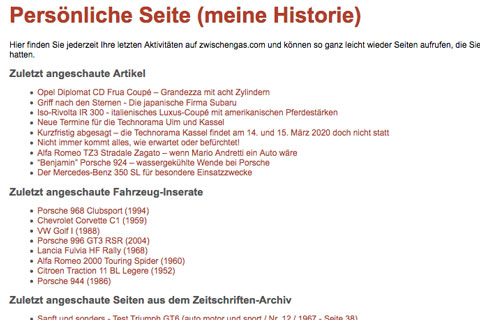
To make it very easy and quick for readers to retrieve the relevant content, there has long been a "personal archive", which is available to every user under "my profile".
Until now, all content stored in it was automatically categorized into images, articles and "other".
Dossier for categorized content collections
Due to high demand for content to be categorized much more specifically and divided into subject areas, the so-called "dossiers" have now been created. From now on, you can not only save links to content in your private archive, but can also create topic collections and thus categorize content links directly. And exactly the way you want it.
You can now open a separate dossier for each desired topic and save the relevant content there and call it up again later.
A dossier can either only be accessed by the person who created the collection of topics or also by other readers. If you do not declare a dossier as "private" but as "secret but visible", you can forward the link to friends. They can then also access the dossier.

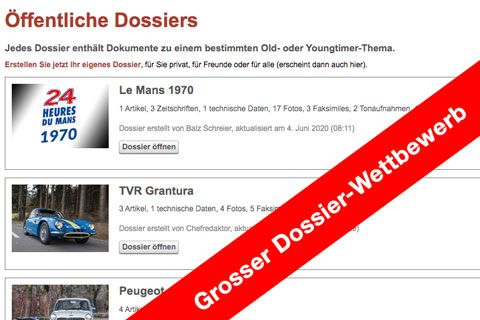
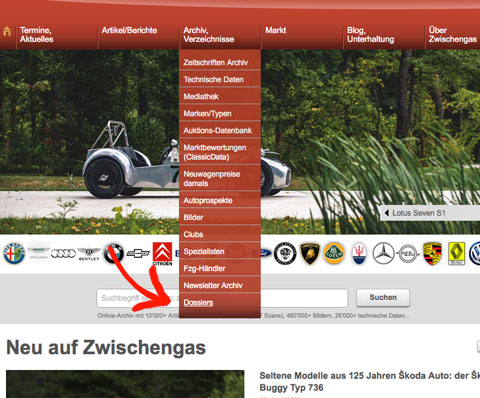
If you, as the "owner" of a dossier, have the feeling that a large group of Zwischengas readers should be interested in the collected content, then the dossier can also be published for everyone. It will then also be offered on a separate overview page, which can be accessed via the menu.
As soon as a dossier is public, it will soon be available in the Google search and can then be helpful for many more people who are looking for data on a specific topic.
The publication of a so-called "public" dossier is carried out directly by the Zwischengas editors; the individual dossier owner can simply initiate it.
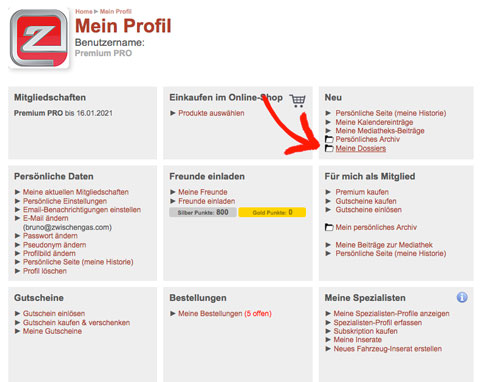
The control center for your own dossiers is located in your personal profile.
And this is how it works:
Step 1 - Create a dossier

Simply give your dossier a title that is as clear and memorable as possible, enter a description and upload a picture.
Step 2 - Add content to a dossier
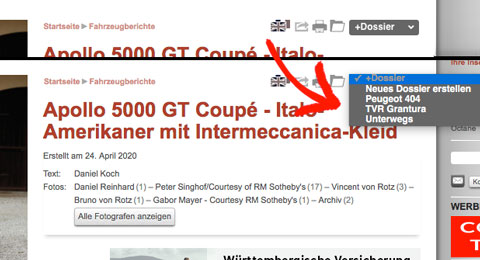
A new button appears at the top of each content that can be placed in a dossier, where you can select the appropriate dossier.
Step 3 - View dossier
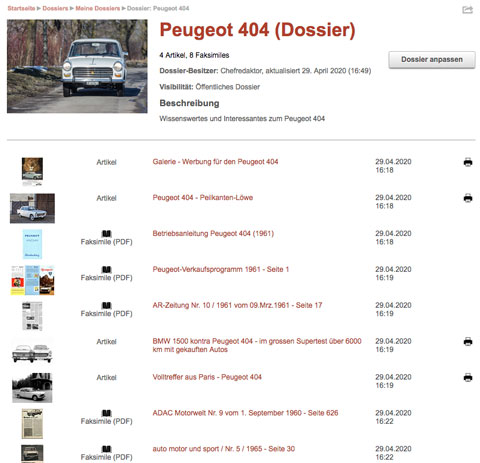
The contents of a dossier are currently displayed in the order in which they were assigned. In the future, you will also be able to sort or specify a desired order as the dossier owner.
However, it is already possible to delete the contents of a dossier. To do this, simply edit the dossier and remove individual entries by clicking on the recycle bin.
The public dossiers, which can also be used as templates, can be found here .
Ideas for dossiers
The range of possible dossiers is just as wide as the amount of content on zwischengas.com. Dossiers could be created on people (e.g. racing drivers, designers), on cars (make/type), on events (e.g. Le Mans, AvD OGP), on eras (e.g. the 1920s), on trends (e.g. buggies) or on technical topics (e.g. catalytic converter, automatic transmission, DeDion axle). Our readers will no doubt think of other focal points, e.g. club officials could create a dossier on the club brand and make it available to club members!
And there is yet another possible use. The dossiers are available on any device on which you register as an Zwischengas reader. This means that interesting articles can be marked/read on the move (on a cell phone) or dossiers can be used on both an iPad and a desktop computer/laptop.
So what are you waiting for? Start cataloging now! It's actually really fun!
P.S. Let us know what you like about the implemented solution and what you would like to see improved. Simply fill out the contact form or send us a support e-mail We look forward to your feedback!