Improved search and new gallery view on zwischengas.com

From time to time, users have pointed out to us that it is sometimes difficult to find something specific in the sheer mass on zwischengas.com.
To get to the bottom of this issue, we analyzed several thousand search queries and compared the behavior of the zwischengas search with Google. Although the previous search offered the expert many options and allowed targeted interventions in search priorities and results, it did not provide enough support for the simpler queries that were made most frequently, such as "Porsche 911 S" or "Lamborghini Miura".
We have therefore adjusted the search algorithm!
From now on, the search results will be prioritized:
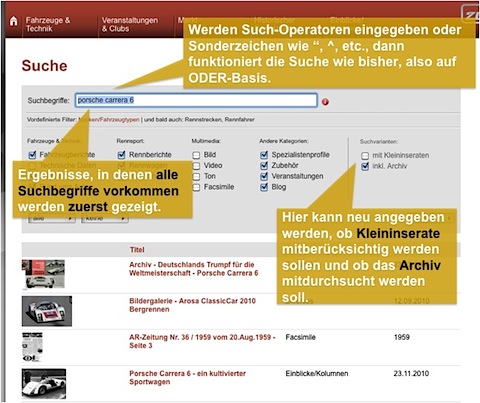
- Results that contain exactly what you entered (including the order of your search terms, e.g. "Porsche 911 S") will be prioritized highest.
- This is followed by results that contain all terms, but not necessarily in the order in which you entered them (e.g. "911 S what kind of Porsche").
- Results that only partially match your input (e.g. "Porsche 911 Carrera") are also given more consideration than before. Finally, results that only contain one term are also displayed. However, these are clearly less important than the previous examples.
- In addition, zwischengas.com also helps to dampen the effects of different spellings. For example, if you enter "911 S" in the new search, zwischengas.com also searches for "911S".
- Similar results are now also prioritized higher than before: If you search for "Ferrari GT", for example, the Ferrari 330 GT is prioritized very highly. However, similar results such as "Ferrari 330 GTC" are now displayed higher than before.
The search can be better controlled with new filters (checkboxes):
On the far right of the filters there are two new checkboxes which you can switch on or off.
- "With small ads": With this option, results that are highly likely to contain classified ads (vehicles for sale, wanted to buy, job ads) are also displayed. This option is normally switched off.
- "Incl. archive": With this option, results from the archive (i.e. Automobil-Revue newspapers from 1906 to 1980) are also displayed. If this option is activated, original scans from the archive are also searched in addition to articles.
For advanced users who know how to use search syntax, there is also the expert search:
Furthermore, complex search expressions can also be entered that contain search operators such as "AND" and "OR" and combine parts with brackets and quotation marks. In these cases, the search works as before.
At the same time, we have also revised the photo galleries.
Previously, galleries had to be browsed through individually, even if you were only interested in certain images. We have added more convenience here. What is not visible at first glance has a great effect, especially with the numerous articles with many photos.
Images can now be viewed in two ways:
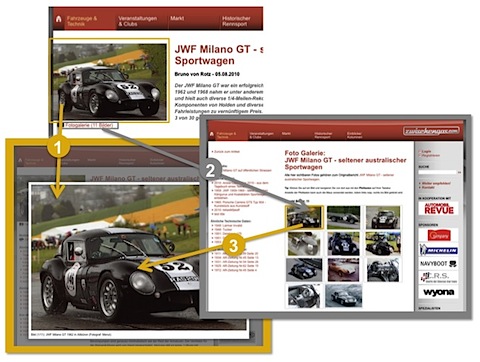
- As before: (1) If you click on the photo at the top left of an article, you will be shown the large view of the photo, in which you can then scroll forwards and backwards using the arrow keys on your keyboard (left/right). As an alternative to the arrow keys, you can also use the mouse by clicking in the left or right third of the photo.
- New: (2) If you click on the text link "Photo gallery" directly below the photo at the top left, you will be taken to a page that displays all the images in the gallery in an overview. This gives you a quick overview of the photos in the gallery and allows you to go to the photo that is of particular interest. If you click on one of the photos (3) in the gallery overview, the large view appears again, in which you can then scroll forwards or backwards as you wish.